





Crimson Desert wasn’t a bad game at launch, but it had plenty of room for improvement. The latest patch, 1.04, finally makes the inventory much better and introduces difficulty levels—we gave it a try.
I like Crimson Desert, I really do. But testing this massive open-world game was also a struggle for me. This was mainly because “user-friendliness” seemed to be a foreign concept to the developers; Crimson Desert kept throwing unnecessarily big obstacles in my way.
A lot has improved since release; the developers have delivered several major updates with countless new features. Now Patch 1.04 has been released and also eliminates what was, for me, the biggest annoyance. I’ve played it and will briefly summarize my impressions.
What’s new?
The patch notes cover hundreds of points; you can find the complete list on page 2 of the article. But I’ve already gone through them and will summarize the highlights for you:
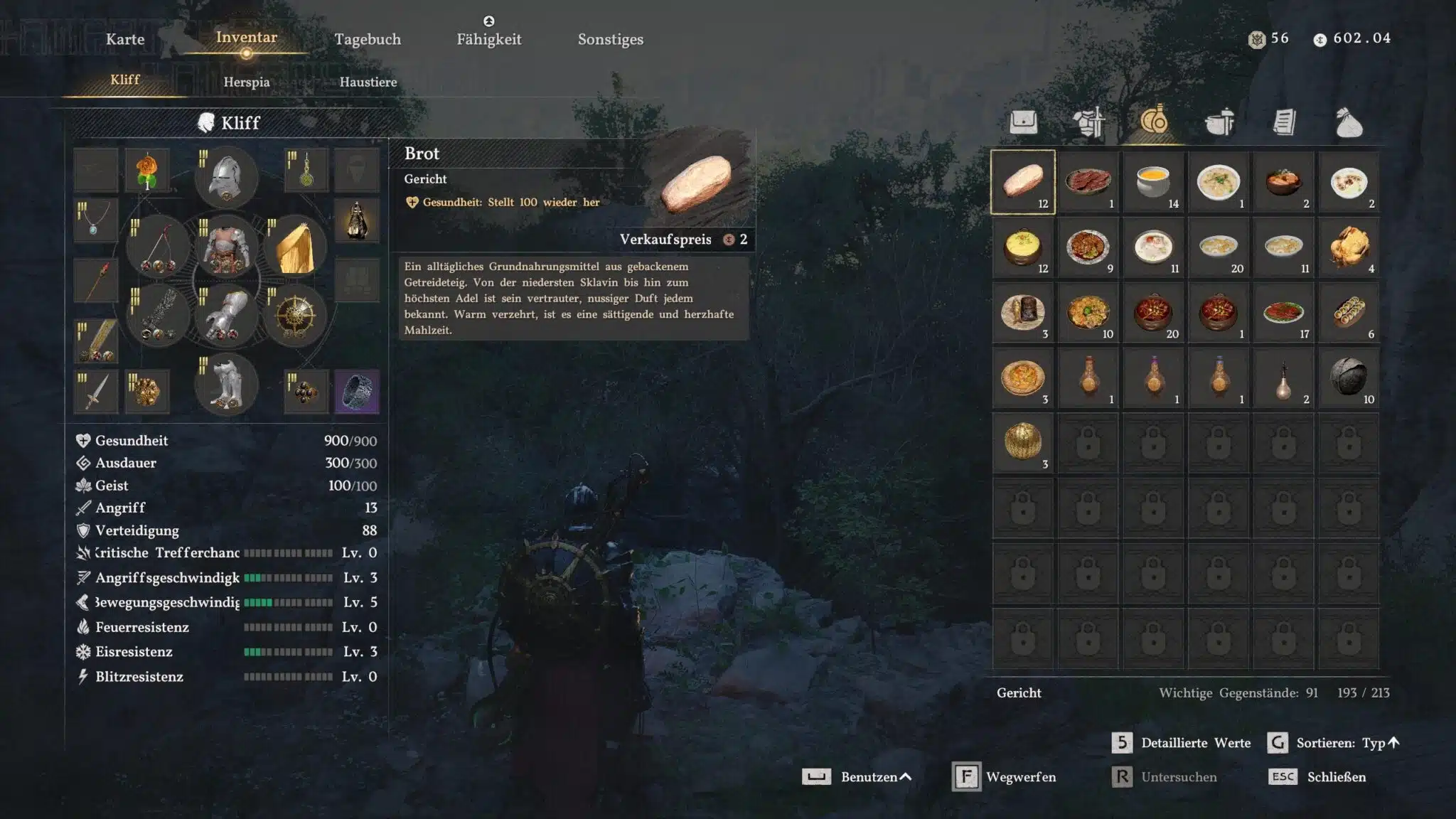
- In the inventory, items are now divided into five categories (and automatically sorted logically within each category):
- Weapons & Armor
- Food & Potions
- Crafting Ingredients (Ores, Herbs, Cooking Ingredients, etc.)
- Scrolls & Books
- Special Items (Abyss Artifacts, Keys, Quest Items, etc.)
- There are now three difficulty levels: Easy, Normal, and Hard:
- Easy:You take less damage, enemies are generally weaker, the windows for dodging and blocking are larger, and boss enemies use counters and evasive maneuvers less frequently.
- Normal:Just as you’ve played so far.
- Hard:Food heals only after the animation completes, you take more damage, enemies are generally stronger, the windows for dodging and blocking are smaller, and bosses react faster and attack more frequently.
- In your house, you can set up multiple storage areas to store collectibles or cooking ingredients. You can then use the stored items at any time for crafting or decorating, even when you’re not in the house.
- Boss enemies have been rebalanced: They are no longer immune while performing powerful attacks, and their attack patterns, as well as the frequency with which they dodge and counter, have been adjusted.
In addition, there are many other changes. For example, birds are now available as new pets, some items can now be stacked in the inventory (Abyss gear, insects, fish), and certain interactions are faster. Animals for your farm can now be purchased directly from a merchant. There are also many adjustments to the controls and combat.
How does it play?
The new inventory is worlds better than the previous version. As a reminder: Previously, every single item was displayed in a large grid. The five categories introduced make inventory management significantly faster.
Even with a very full inventory, I hardly have to scroll anymore. Because the items are also sorted logically within the categories, I can quickly find the helmet, the ingredient, or the book I’m looking for in no time—quite the opposite of before. New features from previous patches also help with this: for example, unread books and notes are now marked with a small icon.
The fact that I can now store crafting materials and collectibles will also ensure that my inventory never overflows again.
I tested the new difficulty settings on an optional boss. On Easy, the boss is hardly a challenge with my highly experienced and well-equipped Kliff: if I skillfully chain together paralyzing attacks, the enemy can barely defend itself.
The situation is different on Hard, however. After barely playing Crimson Desert for a few weeks, the boss wipes the floor with me on my first attempts and drains my health bar extremely quickly. The delayed healing, in particular, makes it hard to save yourself from death in time. So if you’re looking for an extra challenge, you’ve come to the right place.
I haven’t been able to take a detailed look at the other changes in the update yet. But Crimson Desert needs a hotfix right now anyway: With a mouse and keyboard, the setup mode is completely unplayable, and items cannot be placed. Additionally, all mounts except my horse have disappeared from the menu (including the dragon).
With its terrible inventory management, Patch 1.04 almost completely eliminates the problem that has annoyed me the most so far. The only thing that still bothers me is the looting itself: I still can’t see in advance what I’ll loot, or take only a portion of the items I retrieve from a chest or a corpse.
Given how quickly the Crimson Desert developers respond to fan feedback, it will likely only be a few more weeks before that changes as well. Another major feature, however, has already been announced: With one of the upcoming updates, we’ll be able to replay boss fights as often as we like.
The Patch Notes
Table of Contents
Contents
- Under Settings Gameplay, the difficulty levels Easy / Normal / Hard have been added. If you are an experienced Greymane looking for a particularly intense and challenging combat experience, you can select the “Hard” difficulty to make your journey even more demanding.
- We would like to inform all Greybeards who have already defeated numerous bosses in Crimson Desert that a feature will soon be added allowing you to face the bosses of your choice once again.
- Difficulty Level: Easy
- Damage taken by the player is reduced.
- Monsters’ maximum health, aggression, and overall speed are reduced.
- The window for activating the “Lightning Counter” and “Quick Dodge” abilities is extended.
- The frequency with which bosses counterattack or escape after being hit is reduced.
- Difficulty: Normal
- The difficulty level you have been playing on so far.
- Difficulty: Hard
- The effects of dishes are not applied immediately, but only after the usage animation has finished.
- Damage taken by the player is increased.
- Monsters’ maximum health, stun gauge, aggression, and overall speed are increased.
- The activation window for the “Lightning Counter” and “Quick Dodge” skills is shortened.
- The duration of invincibility while rolling is reduced.
- The frequency with which bosses counterattack or escape after being hit is increased.
- Some bosses use additional attack patterns.
- The “Sturdy Storage for Collectibles” has been added, which you can place via “Living” mode.
- The “Sturdy Storage for Collectibles” can be purchased at the furniture store and has 1,000 storage slots.
- When refining or crafting, materials from the “Sturdy Storage for Collectibles” can be used even if you don’t have them in your inventory.
- The “Kuku Food Storage” and “Upgraded Kuku Food Storage” have been added, which you can place via “Living” mode.
- Various dishes and materials can be stored in the food storage units. You can obtain the “Kuku Food Storage” through a quest, and the “Upgraded Kuku Food Storage” through crafting.
- The “Kuku Food Storage” can hold 40 items.
- The “Upgraded Kuku Food Storage” can hold 330 items.
- When cooking, you can use ingredients from the food storage units even if they are not in your inventory.
- Various dishes and materials can be stored in the food storage units. You can obtain the “Kuku Food Storage” through a quest, and the “Upgraded Kuku Food Storage” through crafting.
- The “Collectible Storage” has been added, which you can place via “Living” mode.
- Various quest items and recipes can be stored in the “Collectible Storage”.
- It has 1,000 storage slots and can be obtained through a quest.
- A storage function for clothing has been added to the “Wardrobe,” which can be placed via “Living” mode.
- The “Wardrobe” can be purchased at the furniture store.
- The “Wardrobe” has 100 storage slots. Storage capacity expands depending on the number of wardrobes placed.
- The maximum available storage capacity is limited to 1,000 slots.
- A “Change House” feature has been added, allowing you to select your house’s floor plan within the “Living” content.
- The available house structures are unlocked gradually according to the expansion level of the Graymane Camp.
- Small Standard House
- Medium Standard House
- Large Standard House
- Large Pailune House
- The available house structures are unlocked gradually according to the expansion level of the Graymane Camp.
- The UI and controls for the “Living” content have been improved overall.
- A feature has been added that allows you to collect all furniture placed in the “Living” content.
- The Graymane Camp has been improved. (To avoid spoilers, you can find the changes to this content in the dropdown menu below.)
- After moving to Pailune, you will receive the “Private Storage” item, which can be placed and used in your house.
- A fountain has been added to Howling Hill.
- If you learn a skill through “Learning by Observation” that you have already learned by consuming an artifact, you will now receive the consumed Abyss artifact back.
- Some items that were previously non-stackable can now be stacked.
- Affected: Common Abyss equipment, insects, fish, animals
- New birds have been added as pets. You can encounter these new pets anywhere on the continent of Pywel.
- A “Totem Pole of Bonding” has been added, which allows you to build trust with birds.
- By placing food that the various birds like at the totem pole, you can feed them and build trust.
- The totem pole can be obtained through a quest.
- Five different cats have been added.
- You can adopt the “Abyss Heuk-Lang” as a pet.
- A feature to change the names of pets and horses has been added.
- An issue where cats could incorrectly remain on your shoulder permanently has been fixed. However, since we noticed that many of you actually really appreciated this feature, we’ve added a new item that allows cats to stay on your shoulder longer.
- An additional accessory slot has been added for pets, allowing them to take on even more diverse roles with these items in the future.
- Amulet of Solidarity: When you equip this accessory on a cat pet, the pet will stay on your shoulder longer.
- An additional accessory slot has been added for pets, allowing them to take on even more diverse roles with these items in the future.
- [Damiane] The exclusive one-handed weapon “Star Sword” and a corresponding quest have been added.
- [Kliff/Oongka] The one-handed weapons ‘Branch’ and “Hard Branch” have been added.
- You can obtain these items by breaking wood or bamboo.
- The “Sturdy Broom,” a new tool, has been added.
- The new “Baltheon” outfit is available for Kliff.
- The Rekhia Plate Helmet has been renamed to “Baltheon Plate Helmet.” Cliff can now equip this helmet.
- A secret shop/NPC selling pet equipment has been added in Pororin.
- New clothing items have been added to several shops, including the back alley shops.
- The “Heat-Resistant Kuku Armor” and “Cold-Resistant Kuku Armor” can now be dyed.
- Additional minerals and wells have been placed in several locations across the continent of Pywel.
New cooking animations for vegetable, meat, and fish dishes have been added.(Removed: 04/23/2026)- The attack and defense stats when sharpening equipment with a whetstone and anvil have been reduced.
- An issue where the Cloud Cart could not be summoned has been fixed.
- The Cloud Cart can now be used permanently.
- The crafting and dispatch mission for the Cloud Cart has been modified so that it can only be completed once.
- Prices at the Graymane NPCs have been adjusted so that they now sell goods to their comrades at a 10% discount.
- NPCs selling livestock have been added to the continent of Pywel.
- You can purchase cows, pigs, goats, sheep, ducks, and chickens from these NPCs.
- 13 new character-exclusive tattoos have been added.
- A lock function has been added to prevent you from discarding or selling items.
- The quantity of items obtained through mining and gathering has been adjusted to a consistent amount.
- After resting in bed, the character now stands up immediately.
- NPCs now display more varied reactions to their surroundings.
- As part of ongoing graphical optimizations, some 2D graphic assets have been replaced to better align with the game’s artistic vision.
Controls
- New control presets for controllers, as well as keyboard and mouse, have been added.
- The previous controls correspond to the “Classic” preset.
- More detailed options for configuring controller button mappings will be implemented soon.
- A feature has been added that executes interactions immediately upon pressing a button.
- [Controller]: Navigate to Settings Input Controller Customization and select the “Standard” preset to enable the feature.
- New options for dodge controls and for changing the mapping for roll/dodge have been added.
- You can now choose in the dodge controls whether dodging is performed by double-clicking (default) or by holding down the button.
- When the option to swap the roll/dodge controls is enabled, the corresponding button commands are inverted.
- The aiming controls have been optimized.
- You can now toggle the lantern on and off while aiming.
- When interactive objects are nearby, pressing the aim button now immediately switches the character to aim mode instead of a defensive stance, even if the weapon is drawn.
- The “Control Method: Elemental Skills” option has been added.
- When you use “Use Quick Access,” only the skills of the element selected in the skill quick slot will be executed.
- The controls for the “Jump” skill have been changed.
- The ability can no longer be executed on its own, but is now activated by pressing the jump key during another attack.
- All interactions have been improved so that they now execute continuously as long as you hold down the corresponding key.
- [General]: The “Dismount/Unload” and “Cancel” actions have been merged.
- [Keyboard/Mouse] The number of customizable keys has been increased.
- [Keyboard/Mouse] The button to remove status effects now corresponds to the dodge button.
- [Controller] Holding the touchpad button on the DualSense controller or the View button on the Xbox controller opens the world map.
Combat and Action
- Boss balancing has been fundamentally overhauled.
- Bosses are no longer immune to your attacks while performing powerful attacks.
- The frequency with which bosses counter or evade during a series of hits has been adjusted.
- The attack patterns of some bosses have been optimized.
- The damage taken from elemental status effects has been increased.
- The damage dealt when striking pillars or trees has been slightly reduced.
- The “Pulse Fist” ability now has charge levels.
- Damage increases progressively across up to three levels.
- The speed of examining items has been noticeably improved overall.
- The speed of pushing or rotating objects during puzzle sections has been increased.
- Attacks now transition more smoothly into the next attack even if an attack was blocked.
- The “Reflect Light” ability can now also be used in areas where weapons cannot be drawn.
- The “Reflect Light” ability has been improved so that it now targets the currently selected enemy in combat.
- In unarmed combat, the ability to chain an attack after “Quick Dodge” has been improved.
- [Kliff] The new “Weapon Throw” ability for dual-wielding has been added.
- The ability uses the same button as “Shield Strike.”
- After throwing, you can retrieve the weapons by pressing the button again or moving closer to them.
- [Cliff] The attack speed of the “Power Fist” ability has been increased.
- [Cliff] Fixed an issue where a parry animation would not play after a defense if the main weapon equipped was not a sword.
- [Kliff] Fixed an issue where the “Charge” ability could not be used with certain weapons.
- [Kliff] You can no longer fall off railings when using “Power Transfer.”
- [Damiane/Oongka] The “Power of the Axiom: Raid” ability has been added.
- [Damiane/Oongka] A corresponding ability for “Power Fist: Focus” has been added.
- [Oongka] Fixed an issue where sideways movement was not possible while ascending in flight.
- [Oongka] You can now fire the hand cannon while in flight.
- [Oongka] Fixed an issue where the “Scatter Shot” ability could be used while climbing/hanging even without ammunition.
- The function to inspect items in the inventory can now also be used while riding a horse.
- While wearing the Miner’s Lantern Hat, brightness and detection range have been improved to make it easier to identify mineable ores.
- Additionally, stones can now also be detected.
- The visual effect when healing with the “Power Fist Healing” ability has been adjusted.
- Fixed an issue where the “Lift” interaction was not possible when a bound target fell into water.
- Fixed an issue where stamina regenerated when repeatedly equipping and unequipping a weapon while moving.
- Fixed an issue where Marni’s mech horse could not sprint or swim after you mounted it.
- Fixed an issue where the character would freeze in certain situations when operating mechanical devices.
- Attack transitions when fighting with spears and two-handed weapons have been optimized for a more natural flow.
- [Damiane] The “Quick Reload” skill can now be learned not only through “Learning by Observation” but also by equipping Abyss artifacts. (Added: April 23, 2026)
UI Adjustments and Improvements
- You can now view items in your inventory separately by category tabs.
- The categories consist of a total of six sections: All, Equipment, Food, Materials, Documents, and Miscellaneous.
- Items are sorted according to category tabs, and this setting is retained even after restarting the game.
- In the near future, the same category tabs will also be available for the private warehouse.
- When grouping items in the inventory, a representative icon is now displayed.
- You can enable or disable this feature via Settings Game “Use Group Icon”.
- In the inventory, the tooltips for “Group All Items” and “Group” are now displayed separately.
- Filter and search functions have been added to the world map.
- The maps have been improved so that Memory Fragments you have already obtained are displayed as icons on the World Map and the Mini-map.
- After you obtain a Memory Fragment, the lantern for that Memory Fragment no longer glows.
- A feature has been added to the map that allows you to select the shape and color of markers.
- When your trust level with an NPC reaches the maximum value, the inventory of their shop is displayed on the world map.
- Well icons are now displayed on the world map and mini-map.
- You can now distinguish between the cardinal directions—east, west, south, and north—on the mini-map.
- [Cliff/Damiane/Oongka] The layout of the skill tree has been adjusted.
- In the journal, the Faction Quests and Challenges menu now displays the number of available quests and challenges.
- The journal has been improved so that information about reward items can now be viewed directly.
- A UI has been added that allows you to see your inventory of items on the sales list in the shop.
- An improvement has been made so that the selling conditions are displayed in the store for items that have not been unlocked.
Graphics and Settings
- The rendering quality of distant objects and textures has been improved. The higher you set the graphics options, the more clearly details and visual sharpness are optimized.
- Additionally, an issue has been fixed where background objects that were only supposed to appear under certain conditions were permanently displayed in the distance.
- The rendering quality of characters from a great distance has been improved.
- The lighting quality of hair in shadows has been improved.
- Bugs and flickering effects related to displacement mapping have been fixed.
- The “Maximum” level has been added to the “Subtitle Font Size” option.
- Camera movement has been optimized so that the distance between the camera and the character now remains constant when you adjust the field of view.
- The “Colorblind Mode” option has been added under Settings > Accessibility.
- The “Chromatic Aberration” option has been added under Settings > Accessibility.
- The “Light Sensitivity Protection” option has been added under Settings > Accessibility.
- [PC] The quality of “AMD FSR Ray Regeneration” has been improved.
- [PC] The quality of “Intel XeSS 3.0” upscaling and “Intel XeSS Frame Generation” has been optimized.
- [Steam] Fixed an issue where, with the “Use Steam Input” option enabled for Xbox controllers, right stick rotation movements did not function correctly, e.g., with the “Veil of Wind” ability or when reeling in the fishing line.
- [Mac] Stuttering during gameplay has been significantly reduced.
- [Mac] The “MetalFX Denoising Upscaler” option has been added under Settings > Video. This feature is available starting with macOS Tahoe.
- [Mac] Fixed an issue where switching between multiple displays in the Video settings did not work smoothly.
- [Mac] Fixed an issue where the game launched with an unselected resolution in certain display environments.
- [Mac] HDR quality has been improved. On HDR-capable displays, HDR is now enabled by default in the “For This Mac” preset.
- [Mac] Fixed an issue where the screen appeared excessively dark when HDR was first enabled and then disabled.
Stability and Game Launch
- A change has been made to the “Load” menu so that a message now appears in the corresponding slot if save data is corrupted or is considered invalid for other reasons.
- Fixed an issue where the game could crash if HDR was enabled on monitors that do not support this feature.
- Extensive stability improvements have been implemented for PC, Mac, and consoles, and various causes of crashes have been fixed.
Localization
- Localization errors in all languages have been fixed, and the overall quality of the localization has been improved.
Miscellaneous
- Steppe Runners have been added to desert areas.
- Fixed an issue where the option to hide weapons during cutscenes or gameplay did not work properly under certain circumstances.
- Fixed an issue where the target’s location was displayed inaccurately after failing a bounty hunt.
- If your bounty is too high, you will now be arrested when attempting to turn in a wanted criminal, instead of seeing the usual handover cutscene.
- Mercenaries no longer attack wanted criminals (bounty targets).
- Fixed an issue where, after completing certain quests, the next quest would not start properly.
- In the journal, you can now see if a quest target has been sent on a mission.
- The progress indicator for cumulative quests (e.g., “Rescue the Pailunian Refugees”) has been improved.
- Fixed an issue where the game would occasionally crash when boss fights with Damiane or Oongka were repeated.
- Fixed an issue where the character-switch interface could no longer be used after an automatic transition sequence completed.
- Fixed an issue where you became invincible or unable to move after teleporting via the world map while riding Blackstar.
- Fixed an issue where Blackstar would not move when summoned from a great distance.
- Fixed an issue where items were displayed incorrectly when using the lantern to read memory fragments.
- Fixed an issue in the prologue where enemies would not notice you after you rested in bed.
- Fixed an issue in the Two-Leaf minigame where an endless loading screen would occur if Oongka was caught cheating.
- NPCs can now pick up items again if they dropped them after colliding with you.
- Fixed an issue where parts of clothing were rendered unnaturally during certain movements.
- The display of horse luggage has been improved so that it no longer overlaps with the shield.
- An issue where sound was output incorrectly under certain conditions has been fixed.
- An issue where certain merchant NPCs in Pailune did not appear in some save files has been fixed.
- Fixed an issue where the quest failed if the bounty target was killed after being captured.
- Fixed an issue where Trust Points did not increase even after presenting gifts to the Beggars’ Alliance boss.
- Fixed an issue where the effects of the items “Golden Beer” and “Eye of the Sage” did not function properly.
- Fixed an issue where no knowledge was gained after interacting with the Pailune Militia.
- Fixed an issue where knowledge about “Tristan, the Flame Knight,” “Marnis the Machine Knight,” and the “Battleship” could not be acquired.
- Fixed an issue where Raging Abyss equipment items could not be sold.
- Fixed an issue where enhancement materials, crafting materials, and sharpening values were set differently from the equipment’s material type.
- In addition, various other bugs in the game have been fixed.


