





In Mortal Shell 2, you set the difficulty level yourself: Using special items, you can unlock the brutally hard Night Mode—or make survival easier.
If you’re looking to change the difficulty level in the Mortal Shell 2 menu, you’re looking in the wrong place. Developer Cold Symmetry lets you adjust the level of challenge right within the game.All you have to do is use the right items—and then live with the consequences.
- Slayer Seal: Activate Easy Mode and Lose Achievements
- Gloombound Flame: How to Activate Night Mode
Slayer Seal: Activate Easy Mode and Lose Achievements
If you equip theSlayer’s Seal(Slayer Seal), you’ll make your life in Mortal Shell 2 noticeably easier.
You can find the seal in Marrow Keep.Look for a small outdoor area with a largestone throne standing on a cliff overlooking the sea. The seal is located there, and you can equip it.
The Slayer Seal has the following effects:
- Health & Resolve:Executions not only restore your health but also regenerate your Resolve. You’ll need Resolve for the game’s most powerful attacks, which you’ll be able to use much more frequently.
- Secondary Weapons:Equipped secondary weapons automatically deal Break Damage.
- Slayer Punch:An unstoppable attack that deals massive Break Damage and can automatically trigger a Riposte if the opponent is broken.
However, there’s also a major catch:If you activate the Slayer’s Seal, you can say goodbye to the trophies and achievements in the game.You won’t be able to unlock them for your save file anymore.
But don’t worry: You can safely pick up the seal and store it in your inventory. When you equip it, a warning will also appear, explaining the consequences of your decision. So you don’t have to worry about accidentally activating the seal.
But if you want to freely explore the world without having to struggle against a boss, you can equip the seal. Just keep in mind that you won’t be able to earn achievements anymore.
Gloombound Flame: How to Activate Night Mode
With theFlame of the Gloomy Bond(Gloombound Flame), you can easily ramp up the difficulty to the max and activate Night Mode.
Here’s how to start Night Mode:
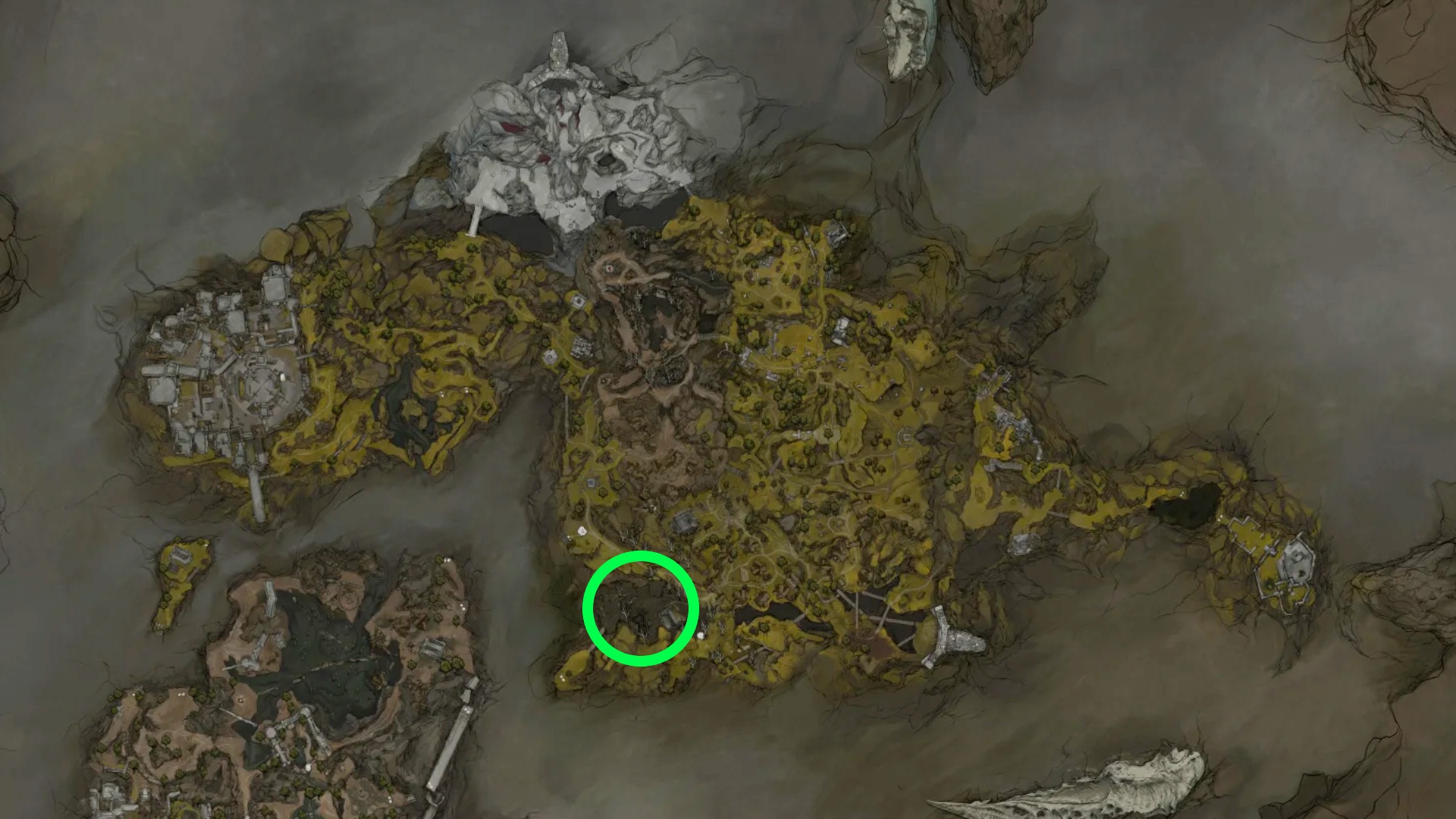
- You’ll find the Gloombound Flame in the area of the optional boss Great Arbiter of Flesh. You’ll need to grab the glowing item next to him.
- With the flame, you must then head to the topmost area of Marrow Keep.
- There, light thestone fire bowlto summon theNPC Thestus.
- Talk to himto unlock Night Mode.
- You can also deactivate Night Mode at Thestus’s location, allowing you toswitch between day and night at any time.
When you activate Night Mode, the world of Mortal Shell 2 is plunged into eternal night.
Not only does this sound grim, but it also has a direct impact on your enemies. They nowattack even more aggressivelyand dealmore damagein the process. This makes for a noticeably greater challenge, especially when fighting bosses.
On the other hand, Night Mode also has some advantages:
- You can find better loot.
- Exclusive events can be triggered in the world.
- There are new enemies and additional NPCs.
- You can explore additional dungeons.
Explore the finer details of Mortal Shell II. First up, game difficulty and how it impacts your experience. mortalshell pic.twitter.com/BX60mBkVVC
— Mortal Shell II (@MortalShellGame) August 10, 2026
Of course, you can still earn achievements in Night Mode.This mode is designed for anyone looking for a special challenge and who really wants to see 100 percent of the game. The higher difficulty level is rewarded with better loot and additional encounters.
Remember that you can disable Night Mode at any time to lower the difficulty again.
Aside from these two items, you can also significantly influence your gameplay experience with other items. For example, a selection of different seals determines how you block or parry in the game—which reflects very different playstyles.
Using an item system to adjust the level of challenge is a clever move. Developer Cold Symmetry skillfully sidesteps the never-ending debate about “easy modes” in the Soulslike genre while still offering the necessary options to let players determine the difficulty level themselves.


